I ran out of GitHub Actions minutes, so I moved CI onto a self-hosted runner on my dev machine. It got five times slower. The culprit wasn’t the hardware: three cache defaults built for GitHub’s throwaway runners were working against a machine that keeps its disk.
GitHub Free’s 2,000 Actions minutes a month are shared across every private repo on the account, and three of my apps draw on them. Paying for overage would have been cheap this time, but three apps will hit the limit every month, and self-hosted minutes are free. For now, anyway: GitHub announced a per-minute charge for them from March 2026, then postponed it without cancelling it.
TL;DR
- Remote caches pay off on GitHub’s runners, which start blank. On a runner that keeps its disk, they re-download what’s already there.
setup-uvwithenable-cache: truepulled 1.24 GB per run. Leaving it at the defaultautocut the job from about 10 minutes to 50 seconds.- Docker layer caches written by pull requests can’t be read by other PRs or
main. Write the cache only frommain.CACHEDin a BuildKit log doesn’t mean the layer is local.keep-stateonsetup-buildx-actiontook a warm build from 434 to 19 seconds.- One repository variable switches every job between GitHub’s runners and mine.
uv’s cache re-downloaded 1.24 GB the machine already had
The app is a FastAPI service on Postgres. Its check job runs ruff, Alembic migrations against an empty database, alembic check, and pytest against a Postgres 16 service container. On GitHub’s runners, check took one to two minutes. On my machine it took about ten, and 534 of its roughly 590 seconds went to one step: restoring the uv cache.
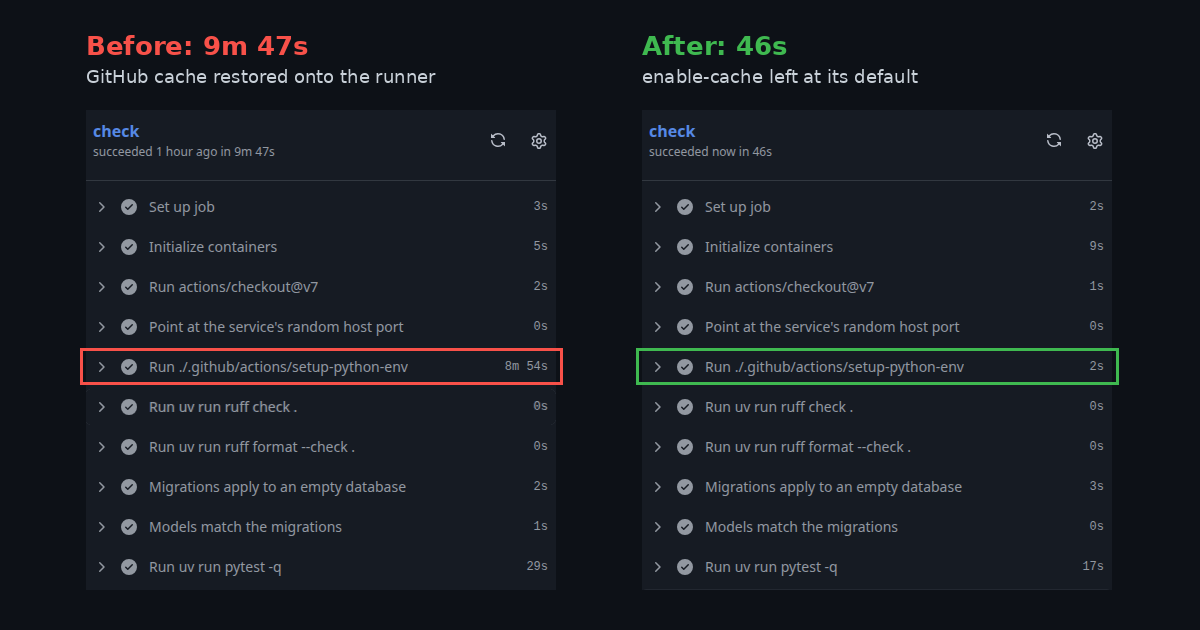
Before and after: the Python setup step with GitHub’s cache restored (left) and with the cache left at its default (right).
My Python jobs install uv through a small composite action using astral-sh/setup-uv, and it forced enable-cache: true. On a GitHub-hosted runner that’s right: every job starts on a blank machine, and restoring a cache beats downloading every package again.
On my machine, uv’s cache was already on disk. But caches saved from self-hosted runners still live in GitHub’s cloud storage, so the first run uploaded a 1.24 GB slice of that directory, and every run after downloaded it back, over a home connection, to the machine it came from.
The fix was deleting the enable-cache: true line, leaving the step as:
- uses: astral-sh/setup-uv@v10.3.2
  with:
    version: "0.9.27"
    cache-dependency-glob: uv.lock
The default, enable-cache: auto, caches on GitHub-hosted runners and skips self-hosted ones. I had overridden a default that knew better. Then gh cache delete <id> removed the stale entry so nothing could restore it.
The next check took about 50 seconds, with 3 of them on Python setup and 29 on pytest. That’s faster than it ever was on GitHub, because the dependency cache is now genuinely local.
Pull requests wrote Docker caches no other run could read
A separate image job builds the Docker image using BuildKit’s GitHub Actions cache, with cache-to: type=gha,mode=max on every run, pull requests included. The cache list filled with entries scoped to refs/pull/42, 43, 44 and 45.
GitHub’s cache access rules make those nearly useless. A cache written by a PR is scoped to that PR: re-runs of it can restore the cache, but the base branch and other PRs can’t. Every PR was uploading layers nothing else would read, over a home connection, into a repository cache capped at 10 GB by default.
So the build reads the cache everywhere and writes it only when pushing, which only happens on main:
cache-from: type=gha
# Only CD writes the cache: entries a PR writes can't be read by other PRs.
cache-to: ${{ inputs.push == 'true' && 'type=gha,mode=max' || '' }}
The PR that made this change wasn’t faster for it: 2:42 against about 2.6 minutes before, because a PR that doesn’t touch dependencies has little to upload. The gain is on PRs that change dependencies or the Dockerfile, and a cache that only holds entries something will read.
CACHED layers still downloaded from GitHub
Merging to main runs both jobs again, then pushes the image to GHCR and deploys it to Dokku. On the first deploy from my machine, Docker marked every layer CACHED, and the build still took over seven minutes:
| Step | My machine | GitHub |
|---|---|---|
| Image build | 434 s | 13 s |
| Dokku deploy | 117 s | 103 s |
CACHED means BuildKit didn’t rebuild a layer, not that the layer was on the machine. With type=gha, the cache is in GitHub’s storage, so to produce the image the builder still downloaded about 200 MB of layers at roughly 0.5 MB/s. That was 405 of the 434 seconds. On GitHub’s runners the cache sits next door.
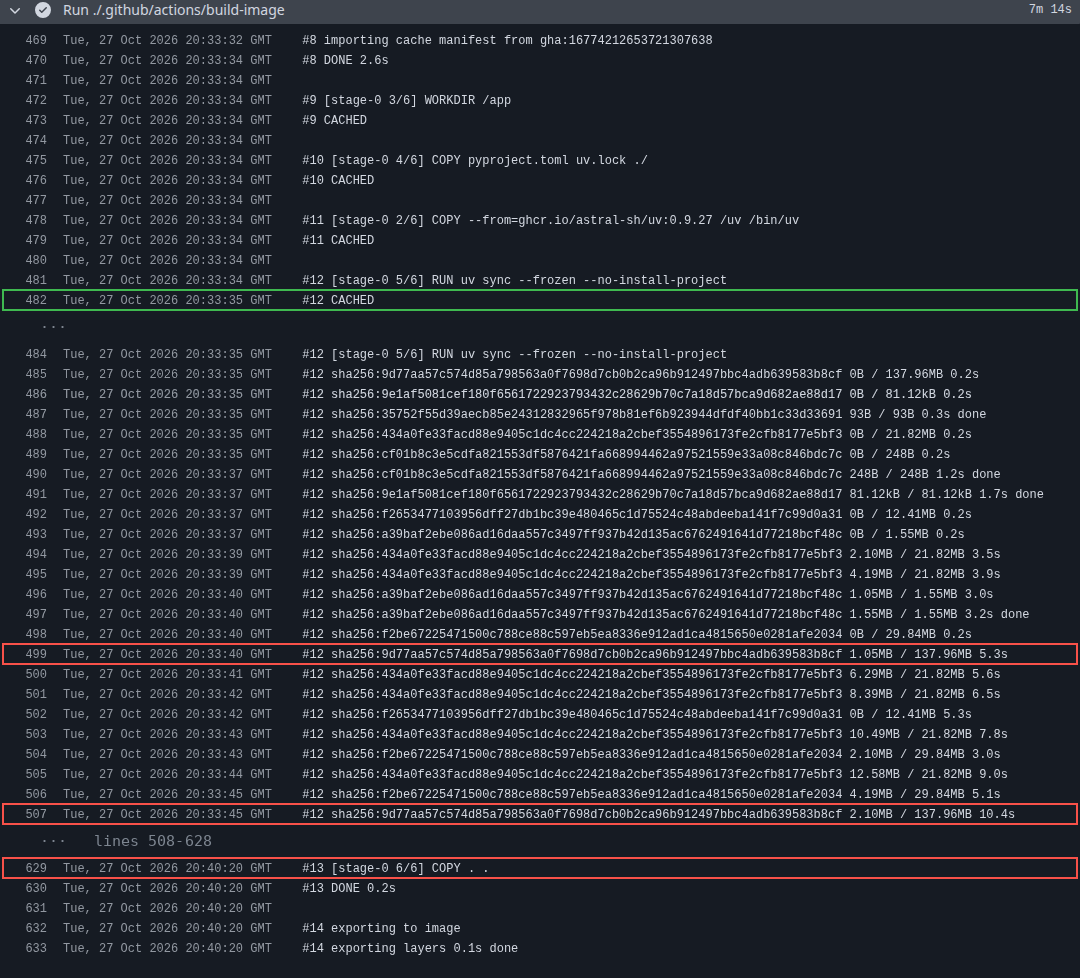
Every layer is CACHED, then the 138 MB dependency layer spends almost seven minutes downloading from GitHub’s cache.
Underneath was a third throwaway-machine default. docker/setup-buildx-action creates a fresh builder for every job and removes it afterwards, so BuildKit’s local layers vanish even on a machine that keeps its disk. Its keep-state input exists for this case; the docs describe it as only useful on persistent self-hosted runners:
- uses: docker/setup-buildx-action@v4
  with:
    name: ci
    keep-state: ${{ runner.environment == 'self-hosted' }}
The state lives in a Docker volume named after the builder, which is why the builder gets a fixed name. GitHub’s runners keep the old behaviour.
The first build after the change took 162 seconds and left that volume behind. The next took 19 seconds, with no layer downloads at all.
All three slowdowns had the same cause: defaults that assume the machine is thrown away after every job.
Fixing the caches got the runtime under control, but moving CI onto a real machine introduced a different set of constraints: it already runs other things, it can only do one job at a time, and it isn’t always on.
My machine was already using port 5432
CI maps its Postgres service container to 5432:5432, which is always free on GitHub’s fresh machines. My dev machine runs its own Postgres on that port. The fix is to let Docker pick a free host port and read it back. job.services isn’t available in a job-level env:, so a step writes the connection string to $GITHUB_ENV:
services:
  db:
    image: postgres:16
    ports:
      - 5432          # was 5432:5432
steps:
  - uses: actions/checkout@v7
  - name: Point at the service's random host port
    run: echo "DATABASE_URL=postgresql://app:app@localhost:${{ job.services.db.ports['5432'] }}/app" >> "$GITHUB_ENV"
One machine runs one job at a time
GitHub runs jobs side by side; a single runner takes them in order. When I merged two pull requests close together, the CD workflow’s guard worked: the first deploy saw main had moved on and skipped itself. But the queue still cost time. It took about 18 minutes from the first merge to the last deploy finishing, against about 4 minutes per merge on GitHub.
On a personal account, a runner also belongs to a single repository, so my other apps can’t share it. Sharing one across repositories needs an organisation, which is free.
The machine isn’t always on
GitHub’s runners are always there. Mine only works while the machine is on, and the runner’s service file doesn’t restart it after a crash. If it’s off, jobs sit in the queue until GitHub fails them after 24 hours.
So I didn’t make the move one-way. Every job’s runs-on reads a repository variable, with GitHub’s runner as the fallback:
runs-on: ${{ vars.RUNNER || 'ubuntu-latest' }}
gh variable set RUNNER --body self-hosted sends jobs to my machine, and gh variable delete RUNNER sends them back to GitHub, with no commit either way.
One last constraint is about trust rather than speed. The runner holds deploy secrets while a job runs, and on a public repository, anyone who opens a pull request could run code on it. For a private repository with one maintainer, that’s a boundary I’m comfortable with. With other contributors, it wouldn’t be.
When to keep the remote cache
The rule I’d take from all of this: keep the remote cache when it saves more time than it costs to transfer, and prefer local persistent state when the runner already has the data and can safely reuse it.
check now takes about 50 seconds, faster than it ever was on GitHub, and a warm image build takes 19. What’s left isn’t speed but availability: CI only runs while my dev machine is on, and moving the runner to an always-on box is a post of its own.